Implementing a CUDA Path Tracer Inside Doom 3
I’ve wanted to do this since 2004. It turned out to be both easier and harder than I expected.
Introduction
This is a writeup of a GPU path tracer I built into id Software’s Doom 3, using the dhewm3 source port as a base. The renderer hooks into dhewm3’s backend, takes the geometry and lights the engine submits each frame, builds a bounding volume hierarchy on the GPU, and path traces the scene instead of rasterizing it. idTech 4 was obviously never designed for any of this, which is part of why I wanted to try.
I first played Doom 3 on an AMD Duron 700 MHz with a Radeon 9250, a machine I still keep in a closet. The unified per-pixel lighting and stencil shadows made a lasting impression on me, and by 2008 I was writing hobby engines against the Doom 3 SDK. A year later I put together my first path tracer — spheres only, closely modeled on smallpt and tokaspt. The code wasn’t good, but it convinced me the technique was within reach.
Combining the two had been on my list for a long time. Schied’s Q2VKPT showed in 2019 that real-time path tracing inside a classic id engine was practical, and Doom 3 is arguably an even better candidate than Quake 2: the source is GPL, there are no baked lightmaps, and every light in the game is an explicit entity carrying position, color, radius, and projection parameters. dhewm3 adds a modern CMake build on top of that.
The approach is deliberately conservative: intercept what the engine submits each frame, upload it to CUDA, build a BVH, trace, and blit the result back through OpenGL. There is no engine rewrite and no new asset pipeline — the whole thing lives in a renderer_cuda/ directory next to the stock renderer/, enabled by a single CMake flag.
Source code: github.com/aknavj/dhewm3-cupt
System Architecture
dhewm3 renders a frame by calling RB_DrawView(), which rasterizes every visible surface. The path tracer replaces this call with RB_CUDA_DrawView(), which reads the same data structures but feeds them through six stages of its own. Figure 1 compares the two paths.
Figure 1. Frame-level control flow — original GL rasterizer (left) and CUDA path tracer replacement (right).
 DOOM 3 FRAME                              CUDA PATH TRACER
 ===========================               ===========================

 idSession::Frame()
       |
       v
 idRenderWorld::
   GenerateAllInteractions()
       |
       v
 idRenderBackend::
   ExecuteBackEnd()
       |
       v
 +---RB_DrawView()---+                     RB_CUDA_DrawView()
 |  (GL rasterizer)  | --- replaced by --->       |
 |                    |                     +------+------+
 | for each drawSurf  |                     |             |
 |   GL_DrawElements  |                  iterate       iterate
 | for each light     |                  drawSurfs     viewLights
 |   stencil shadows  |                     |             |
 |   light pass       |                     v             v
 +--------------------+               AddTriangle()  AddLight()
       |                              GetOrSetMaterial()
       v                                    |
 GL SwapBuffers                             v
                                      EndFrame()
                                        | cudaMemcpy --> device
                                        | build LBVH
                                        v
                                      RenderView()
                                        | primary rays
                                        | BVH traversal
                                        | material eval
                                        | direct light + shadows
                                        | indirect bounce
                                        v
                                      ToneMap()
                                        | HDR --> LDR
                                        v
                                      CopyToBackbuffer()
                                        | cudaMemcpy --> host
                                        v
                                      glDrawPixels()
                                        |
                                        v
                                      [screen]
Scene extraction. The first stage walks backEnd.viewDef->drawSurfs — the same list the GL renderer would consume — and copies vertex positions, normals, tangents, UVs, and indices into flat arrays. Entity transforms are baked into world space on the CPU. Materials are sourced from idTech 4’s idMaterial shader stages and flattened into a cudaMaterial_t struct. Lights are extracted from backEnd.viewDef->viewLights, with point, directional, and projected types mapped to a unified cudaLight_t.
GPU upload. Scene data is transferred to device memory with cudaMemcpy. Materials and textures are pointer-cached across frames, so only new entries get uploaded. Lights are rebuilt every frame because they animate.
BVH construction. A Linear BVH is built entirely on the GPU using the Karras (2012) algorithm — four custom kernels plus a Thrust radix sort. This is detailed in the Acceleration Structure section.
Path tracing. One thread per pixel, launched in 16×16 tiles. Each thread fires a primary ray with sub-pixel jitter, traverses the BVH, evaluates materials, samples direct lighting, and optionally bounces for indirect illumination. Results accumulate into a float4 HDR framebuffer. Listing 1 shows the core of the per-pixel kernel — primary ray generation through the bounce loop.
Listing 1. Per-pixel path tracing with sub-pixel jitter and iterative bounce evaluation.
// per-pixel RNG seeded from pixel position + frame index
unsigned long long pixelSeed =
    (unsigned long long)(y * width + x) * 1000003ULL
    + (unsigned long long)frameIndex * 999983ULL;
curandState randState;
curand_init(pixelSeed, 0, 0, &randState);

for (int sample = 0; sample < samplesPerPixel; sample++) {
    // primary ray with sub-pixel jitter
    float jitterX = curand_uniform(&randState) - 0.5f;
    float jitterY = curand_uniform(&randState) - 0.5f;
    float u = ((float)(x) + 0.5f + jitterX) / (float)width  * 2.0f - 1.0f;
    float v = ((float)(y) + 0.5f + jitterY) / (float)height * 2.0f - 1.0f;

    cudaRay_t ray;
    ray.origin    = cameraPos;
    ray.direction = normalize(cameraForward
                   + u * cameraRight * tanHalfFovX
                   + v * cameraUp    * tanHalfFovY);

    float pathThroughput[3] = { 1, 1, 1 };
    float pathRadiance[3]   = { 0, 0, 0 };

    for (int iteration = 0; iteration < maxPasses && depth < maxDepth;
         iteration++) {
        cudaHitInfo_t hitInfo;
        if (!IntersectBVH(ray, vertices, triangles, bvhNodes,
                          triIndices, materials, hitInfo)) {
            // sky or miss — accumulate and break
            break;
        }
        // evaluate material, sample direct light, bounce...
    }
}
The outer sample loop runs the configured samples-per-pixel count. The inner iteration loop handles both bounces and transparent passes — alpha-tested surfaces, decals, and glass don’t increment the bounce depth, so a ray can pass through many transparent layers before it spends a bounce.
Tone mapping. A post-processing kernel converts HDR to LDR using one of three selectable operators — Reinhard, ACES, or Uncharted 2 — followed by gamma correction.
Blit. The final pixel buffer is copied back to host memory and drawn with glDrawPixels. There is no GL-CUDA interop yet; this was the simplest output path to get working, and it has stayed in place longer than it probably deserves to.
The renderer exposes eight selectable visualization modes via the r_cuMode CVar, each isolating a different pipeline stage. Figures 2 through 7 show the same frame rendered across these modes.
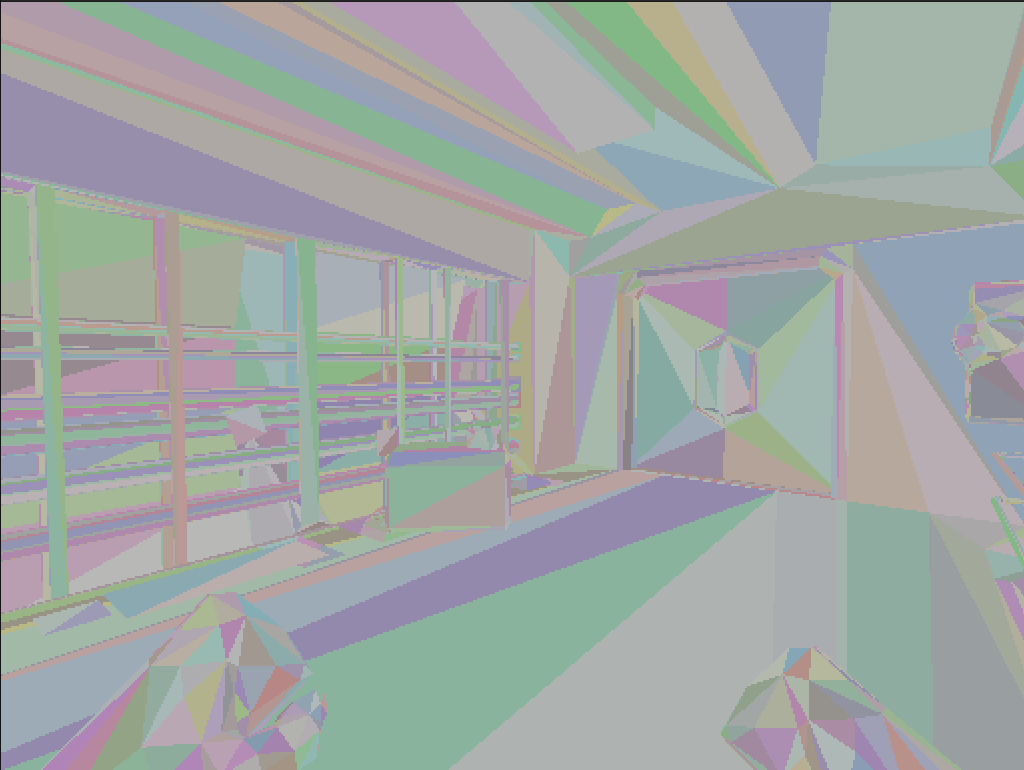 Figure 2.
 r_cuMode 1 — BVH traversal debug visualization with random per-triangle coloring.
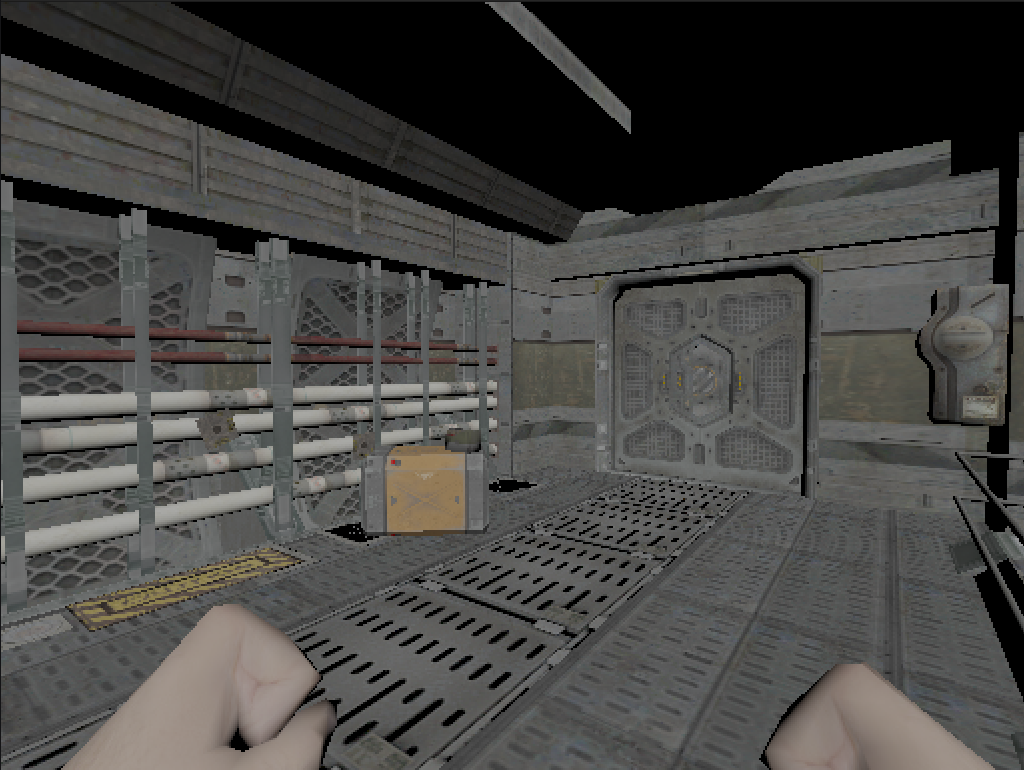 Figure 3.
 r_cuMode 4 — Albedo texture output.
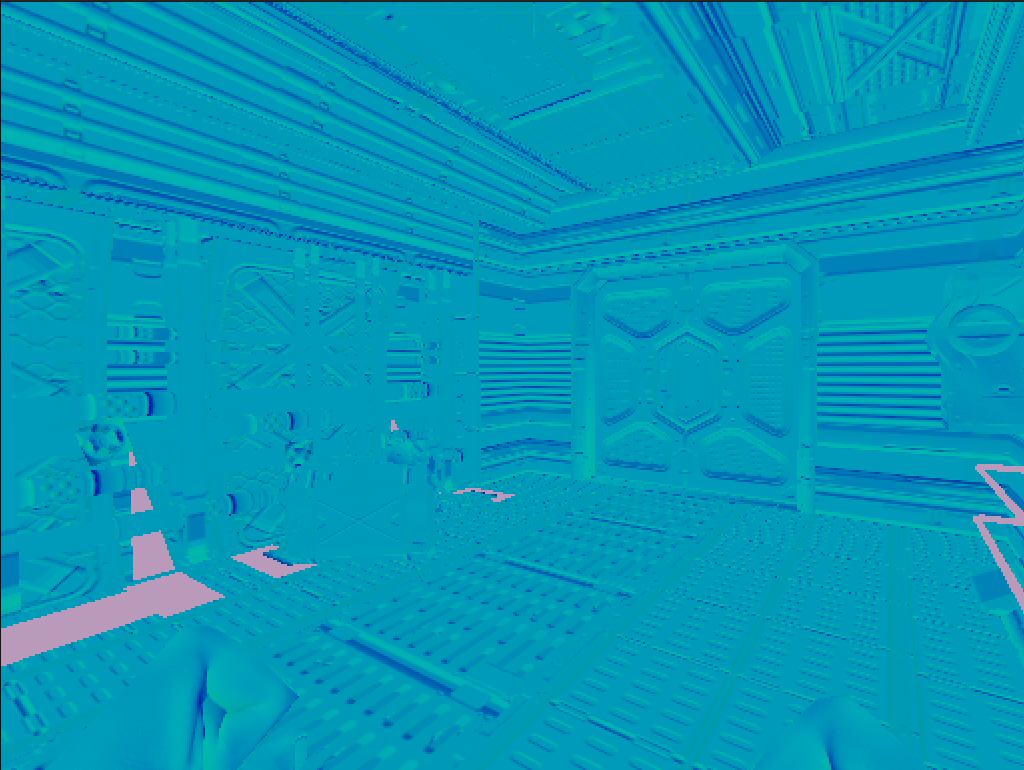 Figure 4.
 r_cuMode 5 — Normal map visualization.
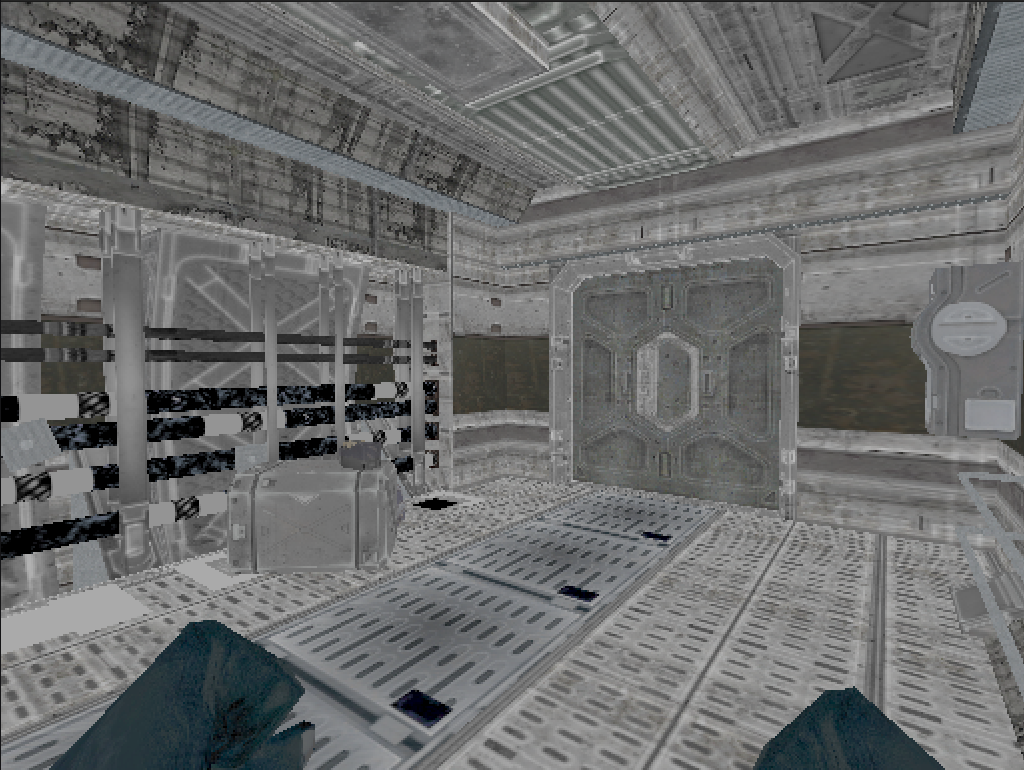 Figure 5.
 r_cuMode 6 — Specular map visualization.
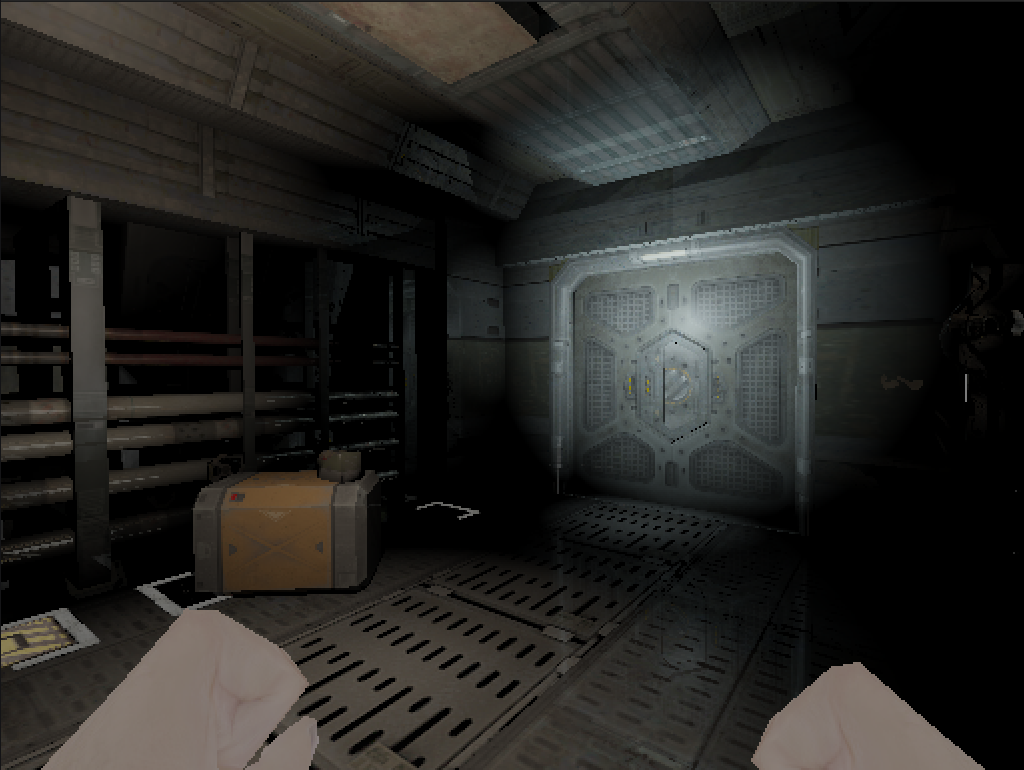 Figure 6.
 r_cuMode 7 — Whitted-style ray tracing with direct lighting, Blinn-Phong specular, and mirror reflections.
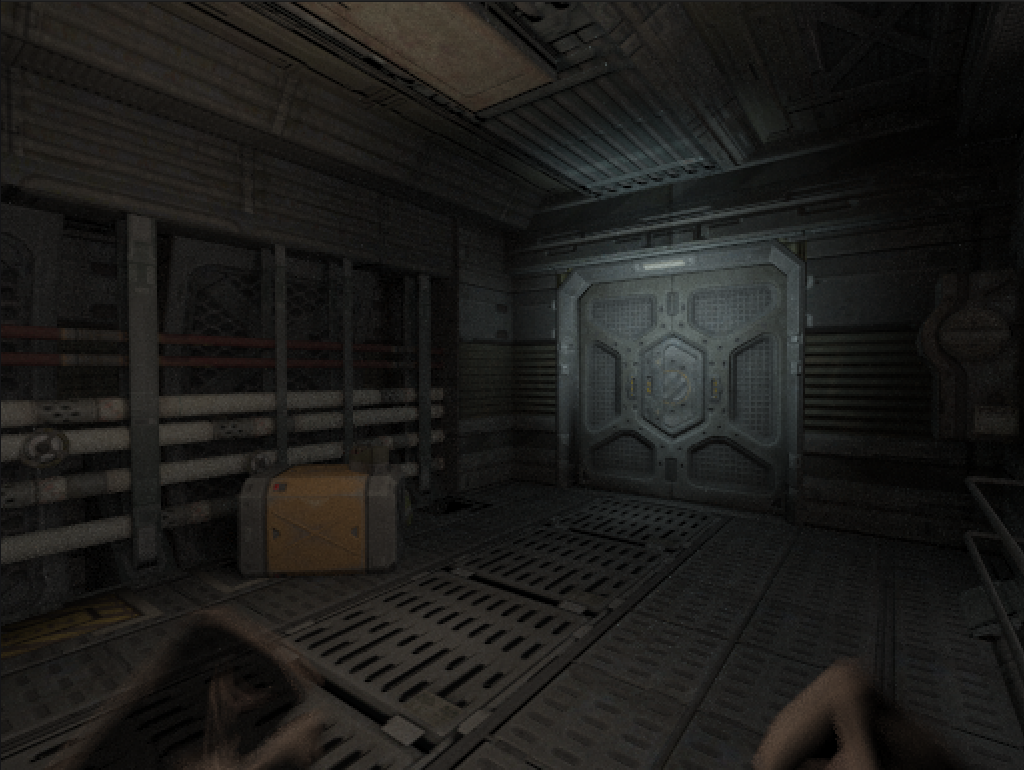 Figure 7.
 r_cuMode 0 — Full PBR path tracing, converged at approximately 32 accumulated frames.
Acceleration Structure
Doom 3 levels run to a few hundred thousand triangles, and because entities move, the BVH has to be rebuilt every frame. Building it on the CPU and uploading the result turned out to be roughly an order of magnitude too slow, so the construction runs entirely on the GPU, following Karras’s 2012 paper. It breaks down into five phases — four custom kernels, plus a sort delegated to Thrust.
Morton codes. Each triangle’s centroid is normalized to $[0, 1]$ within the scene’s axis-aligned bounding box and encoded into a 30-bit Morton code — 10 bits per axis, interleaved via expandBits. This maps three-dimensional spatial proximity to a one-dimensional sort key along a space-filling Z-curve.
Radix sort. Thrust’s sort_by_key sorts the Morton codes and their associated triangle indices in parallel. This is the most expensive phase and the one that forces a host synchronization — the CUDA stream has to drain before Thrust takes over the default stream. I considered writing a custom radix sort to avoid the sync and decided against it; Thrust’s is a production-grade primitive, and beating it is not a fight worth picking here.
Radix tree. An internal node kernel determines the split position for each node using the delta function — __clz applied to XOR’d Morton codes, with index-based tiebreaking for duplicates. Each internal node receives left and right child pointers. Parent pointers are stored for the subsequent bottom-up pass.
Leaf init. A separate kernel writes leaf nodes containing per-triangle bounding boxes, epsilon-padded to prevent grazing-ray intersection misses.
Bottom-up AABBs. Starting from every leaf, each thread walks up the parent chain. An atomic counter per internal node ensures that the second child to arrive computes the union AABB while the first child exits immediately. This guarantees that every internal node is visited exactly once.
The custom kernels run on a dedicated CUDA stream. Thrust’s sort_by_key, however, forces a stream sync and runs on the default stream. I spent a while trying to work around this before accepting it as the one host-side stall in the build pipeline.
Traversal. At render time, each thread performs a stack-based BVH walk with front-to-back child ordering. The thread maintains a 128-entry local stack and pushes the nearer child last so it is popped first. Listing 2 shows the traversal loop.
Listing 2. Stack-based BVH traversal with front-to-back ordering.
int stack[128];
int stackPtr = 0;
stack[stackPtr++] = 0;  // root

while (stackPtr > 0 && stackPtr < 128) {
    int nodeIndex = stack[--stackPtr];
    const cudaBVHNode_t& node = nodes[nodeIndex];

    // slab test against node AABB
    float tmin = ray.tMin;
    float tmax = foundHit ? hitInfo.t : ray.tMax;
    for (int i = 0; i < 3; i++) {
        float invD = 1.0f / ray.direction[i];
        float t0 = (node.bounds[i] - ray.origin[i]) * invD;
        float t1 = (node.bounds[i + 3] - ray.origin[i]) * invD;
        if (invD < 0.0f) { float tmp = t0; t0 = t1; t1 = tmp; }
        tmin = fmaxf(tmin, t0);
        tmax = fminf(tmax, t1);
        if (tmax <= tmin) goto skip_node;
    }

    if (node.leftChild == -1) {
        // leaf — test triangles
        for (int i = node.firstPrimitive;
             i < node.firstPrimitive + node.primitiveCount; i++) {
            if (IntersectTriangle(ray, vertices, triangles[triIndices[i]],
                                  materials, hitInfo)) {
                hitInfo.triangleIndex = triIndices[i];
                foundHit = true;
            }
        }
    } else {
        // push children — nearer child on top
        float leftDot  = dot(leftNode.center  - ray.origin, ray.direction);
        float rightDot = dot(rightNode.center - ray.origin, ray.direction);
        if (leftDot < rightDot) {
            stack[stackPtr++] = node.rightChild;  // far
            stack[stackPtr++] = node.leftChild;   // near (popped first)
        } else {
            stack[stackPtr++] = node.leftChild;
            stack[stackPtr++] = node.rightChild;
        }
    }
    skip_node:;
}
Front-to-back ordering lets early hits tighten tmax quickly, which prunes large subtrees before any triangle test runs. In my measurements this roughly halved traversal cost compared to pushing children in arbitrary order — about what you’d expect in Doom 3’s heavily occluded interiors.
Material Conversion
I underestimated the material system badly. Doom 3’s idMaterial isn’t a texture-per-surface mapping — it’s a multi-stage shader pipeline where a single material can declare bump, diffuse, specular, and ambient interaction stages, blend modes, alpha tests, vertex colors, and animated texture registers. The path tracer wants something much flatter: albedo, normal, roughness, metallic, and a handful of behavioral flags. So there is a conversion layer that walks each material’s stages and extracts whatever it can make sense of.
Diffuse stages are the easy case: one albedo texture, one color multiplier.
Bump stages provide normal maps. Doom 3 uses the RXGB encoding — the X component occupies the alpha channel, Y green, Z blue. The kernel reconstructs tangent-space normals accordingly. When the tangent frame is degenerate, the kernel fabricates an orthonormal basis from the geometric surface normal.
Specular stages provide a specular intensity map. Roughness and metallic are derived heuristically from specular luminance — brighter specular means lower roughness and more metallic weight. Any PBR artist would wince at this, and fairly. But the goal here is reproducing how Doom 3’s surfaces were meant to look, not authoring correct PBR data, and the heuristic gets the visual weight right for most of the game’s materials.
Beyond the stages, the coverage type sets alpha test thresholds for perforated materials (grates, fences) and blend modes for glass and additive particles. Emission is inferred: materials with no interaction stages — light panels, screens, GUI surfaces — are treated as emissive. Vertex colors pass through for particles and decals, and texture transforms (scale, rotate, scroll) are read from shader registers and applied during UV computation.
Materials are pointer-cached using an idHashIndex keyed on the idMaterial pointer. A material is converted once and reused across frames until a texture overflow forces a full cache flush.
Shading Model
The shading model is a Cook-Torrance microfacet BRDF with the GGX distribution — the same combination Karis described for Unreal Engine 4 in 2013, and by now the default choice for PBR pipelines. It consumes the albedo, roughness, and metallic values produced by the material conversion, and covers the range from rough diffuse to sharp metallic reflection without special cases — which is exactly what a scene full of scratched metal and painted concrete needs.
Normal distribution function. The GGX (Trowbridge-Reitz) distribution defines the microfacet orientation probability:
\[D(\mathbf{h}) = \frac{\alpha^2}{\pi\left((\mathbf{n} \cdot \mathbf{h})^2(\alpha^2 - 1) + 1\right)^2} \tag{1}\]where $\alpha$ is the roughness parameter and $\mathbf{h}$ is the half-vector. GGX has heavier tails than Blinn-Phong, so specular highlights stay broad at grazing angles — which is most of what makes Doom 3’s metal floors look wet under the base’s overhead lights.
Geometry term. Smith’s method with the Schlick-GGX approximation accounts for microfacet self-shadowing and masking:
\[G(\mathbf{n}, \mathbf{v}, \mathbf{l}) = G_1(\mathbf{n} \cdot \mathbf{v}) \cdot G_1(\mathbf{n} \cdot \mathbf{l}) \tag{2}\]This is what keeps rough surfaces from blowing out at steep viewing angles.
Fresnel term. The Schlick approximation models reflectance variation with viewing angle:
\[F(\theta) = F_0 + (1 - F_0)(1 - \cos\theta)^5 \tag{3}\]The diffuse component uses energy-conserving Lambertian reflectance: $k_d = (1 - F)(1 - \text{metallic})$, scaled by $\frac{\text{albedo}}{\pi}$. Metallic surfaces receive no diffuse contribution — all color is carried through specular reflection.
Specular correction. One detail here cost me about a week. Doom 3’s interaction shaders double the specular term — literally result = diffuse + specular * 2 — and every surface in the game was tuned against that. My physically correct evaluation produced frames where the math checked out and every metal surface looked dead. The fix is a CVar, r_cuSpecularBoost, defaulting to 2.0×. It matches what the artists saw, not what the textbook says, and I consider that the right call.
Light Evaluation
idTech 4 defines three light types: point, parallel (directional), and projected (spotlight with a texture frustum). All three are extracted from the engine’s viewLight_t list each frame and evaluated during path tracing.
Point lights. Attenuation follows a windowed quadratic function using Doom 3’s axis-aligned light radius as the falloff boundary:
\[A(d) = \left(1 - \left(\frac{d}{r}\right)^2\right)^2 \tag{4}\]This falls off smoothly to zero at the radius boundary, avoiding both a hard cutoff and the inverse-square singularity at $d = 0$.
Projected lights. Each projected light carries four frustum planes (lightProject[4]) that define a textured light volume. The tracer evaluates these planes to get UV coordinates within the projection, samples the light texture there, and applies a falloff gradient along the frustum depth. Cone angle and edge softness come out of the frustum geometry. I got this wrong several times before it stabilized, and the failure mode is always the same: every spotlight in the game turns into a featureless white cone.
Direct light sampling. For each shading point, shadow rays are cast toward up to r_cuMaxLightSamples randomly selected lights, weighted by $\frac{N_{\text{lights}}}{N_{\text{samples}}}$ to maintain an unbiased estimator. The shadow test is transparency-aware: it walks through alpha-tested, transmissive, and blended surfaces, attenuating the shadow ray per-material rather than treating every intersection as fully opaque. This produces correct shadows through chain-link fences, tinted glass, and particle effects.
Soft shadows come from jittering the light sample position within the light’s spatial extent — point lights within their lightRadius3 bounds, spotlights along their right and up axes. The jitter scale is exposed as r_cuSoftShadowScale.
Indirect illumination. A single-bounce GI pass fires one cosine-weighted hemisphere sample from the primary hit point. The indirect ray walks through transparent surfaces (up to four steps) until it hits something opaque, evaluates direct lighting there — shadow test included — and returns that as incident radiance. The bounce fires at a configurable probability (r_cuIndirectProb). This one bounce does a lot of work: it supplies the ambient light that makes Doom 3’s corridors read as connected spaces rather than isolated pools of light. Seeing light bleed around a door frame that the original renderer leaves pitch black was the moment I stopped doubting the approach.
Volumetric Scattering
I’ll admit this feature has no justification beyond wanting it. Doom 3 never shipped with volumetric lighting, and ray-marched scattering is expensive. But the flashlight beam cutting through a dark corridor is the image everyone remembers from this game, and I wanted to render it properly at least once.
The kernel ray-marches from the camera to the first surface hit. At each step it casts a shadow ray toward the light, computes distance attenuation, evaluates a Henyey-Greenstein phase function for directional scattering, and accumulates in-scattered radiance weighted by Beer’s law transmittance. Spotlights get a minimum forward scattering bias ($g \geq 0.7$) so their beams read as cones instead of dissolving into fog.
Projected light textures are sampled during the march too, so a light with a colored gel tints the medium it passes through, not just the surfaces it lands on. It is the single most expensive feature in the renderer. I have no plans to remove it.
Artist-Faithful Rendering
The path tracing math is the well-documented part of this project. The harder problem was making the result look like Doom 3 — not a generic PBR renderer that happens to load Doom 3 assets, but the actual game, with its artistic decisions intact.
No ambient fill. The tracer trusts the placed lights and nothing else — no environment map, no sky bleed, no constant ambient term. A corridor with no idLight entities renders black, because that darkness is Doom 3’s visual signature. Adding a hemispheric ambient term would take five minutes and ruin the game.
Blend-mode classification per hit. The original renderer handles alpha-tested grates, additive particles, modulate-blended decals, and translucent glass through draw-order blending. A path tracer has no draw order, so each intersection gets classified instead: pass-through (attenuate throughput), additive (add energy), modulate (multiply throughput), or bounce. Transparent classifications don’t consume bounce budget, so a ray can traverse twenty decal layers as one logical bounce. Opaque noShadows decals — blood splatters, bullet marks — need their own special case: light the decal, composite it over the throughput, and continue the ray. Before I added this classification, every decal in the game was an opaque wall.
The guiding rule throughout: match what the original renderer did, not what a physically based renderer should do. The artists at id Software tuned every surface against a specific rendering architecture, and none of those assumptions transfer automatically. The interesting design constraint was honoring them while adding the things the original couldn’t do — soft shadows, indirect light, volumetrics.
Limitations and Runtime Characteristics
This is an interactive path tracer for a game engine, not a production renderer, and the design reflects that at every level.
One-bounce indirect illumination. The GI pass takes a single hemisphere sample at the primary hit and evaluates direct lighting wherever it lands. There is no recursive multi-bounce GI, no photon mapping, no irradiance caching. In Doom 3’s tight, heavily occluded corridors, one bounce supplies most of the perceptible ambient; further bounces would multiply the ray count for a difference I doubt anyone would notice.
Cosine-weighted hemisphere sampling. Bounce directions are drawn proportional to $\cos\theta$, the simplest defensible importance sampling strategy. There is no BRDF importance sampling and no multiple importance sampling. MIS is standard in production renderers for good reason — without it, glossy highlights converge slowly and caustics never resolve at all. I traded that variance reduction for implementation simplicity: one sampling strategy, one PDF, no weight bookkeeping.
Other standard features are absent for similar reasons. All computation is RGB, so there is no spectral dispersion. Surfaces are opaque at the shading point, so no subsurface scattering for skin or wax. Paths trace exclusively from the camera, so specular-to-diffuse transport (caustics) is invisible. In a game made of metal corridors and concrete, none of these omissions show.
No denoiser. Noise is handled by brute-force temporal accumulation: each frame adds into a persistent HDR buffer, the tone mapper divides by the accumulated frame count, and camera movement resets everything. At 4 SPP the first frame is grainy but legible, direct lighting cleans up after about 50 frames, and soft shadows take a few hundred. Russian roulette terminates low-energy paths with the usual inverse-probability compensation, and a firefly clamp keeps single hot samples from dominating a pixel’s average.
Scene capacity is fixed at compile time — 1M triangles, 2K textures, 512 lights, 2M BVH nodes, all cudaMalloc‘d once at startup. Transparency-aware shadow rays give up after 8 surfaces. Every pixel gets the same SPP regardless of local variance. These limits are comfortable for Doom 3; they would not survive contact with an open-world scene.
Runtime configuration. Everything is gated behind a CMake flag (-DCUDA_PATHTRACER=ON) and a runtime CVar (r_cuDraw 1); with the flag off, dhewm3 builds and runs its stock OpenGL renderer unmodified. Around 50 CVars expose SPP, bounce depth, Russian roulette thresholds, soft shadow scale, fog density, tone mapping operator, and so on — all adjustable from the Doom 3 console mid-game, which made tuning far less painful than recompiling would have been. At the default 0.5× render scale the renderer runs at interactive rates on RTX hardware.
What it produces is plausible images at interactive rates — enough to walk through Doom 3 and watch real light transport interact with real geometry. The missing features listed above aren’t a roadmap; most of them would require rewriting the kernel around a different architecture. The project set out to answer one question — what does Doom 3 look like under physically based light transport — and I tried to resist answering any others.
Discussion
Most of the difficult bugs in this project shared a trait: the renderer kept producing images, and the images were wrong in ways I could only detect by A/B comparison against the GL backend. Three examples stayed with me.
Specular energy loss. Early builds rendered physically plausible frames in which every metal surface looked matte. The Cook-Torrance code was correct; the problem was the 2× specular multiplier described earlier, hiding in the original interaction shaders. What made this bug nasty is that the broken output didn’t look broken — it looked conservative. Only a side-by-side of the same brushed-steel panel under both renderers made it obvious. Correct math producing wrong pictures because the data was authored against different math turned out to be the recurring theme of the whole project.
Tangent frame degeneracy. Some func_static entities — pipes and trim geometry, mostly — rendered with inverted or scrambled normals. I spent three days assuming a BVH intersection bug, because dark splotches on curved surfaces look like an intersection bug. The actual cause was in the assets: some meshes ship with zero-length or collinear tangent/bitangent pairs, which the GL renderer tolerates because it derives tangent space differently. Once diagnosed, the fix was one function — detect the degenerate frame, build an orthonormal basis from the geometric normal instead.
Projected light UV precision. The lightProject[4] planes produce UV coordinates through four dot products, and floating-point error in the frustum depth calculation showed up as hard banding rings in what should have been smooth spotlight falloff. The GL renderer never hit this because its stencil-and-blend pipeline never evaluates the projection as a continuous function. Normalizing the depth interpolation and adding an epsilon floor fixed it.
All three bugs point at the same underlying fact: Doom 3’s data and its renderer had an implicit contract that nobody ever needed to write down, because both sides were developed together. Swapping out the renderer broke every clause of that contract at once. In practice, much of this project was less about implementing light transport and more about reverse-engineering twenty-year-old assumptions from the render output.
Future Work
The immediate plan is an OpenCL port. The project is currently locked to NVIDIA hardware, which limits both who can run it and what I can test against. Nothing in the design is actually CUDA-specific — the kernel structure, BVH layout, and material pipeline would carry over — so the translation is mostly mechanical: launch syntax, allocation APIs, math intrinsics. The real casualty is Thrust’s sort_by_key, which would need replacing with a custom radix sort or something like CLRadixSort.
After that, the optimization backlog becomes worth touching: a two-level acceleration structure so static geometry stops being rebuilt every frame, GL interop to kill the glDrawPixels round trip, and better importance sampling. None of it changes what the renderer draws — only how long a frame takes.
References
- Project source: aknavj/dhewm3-cupt — the full CUDA path tracing fork of dhewm3
- Christoph Schied, Q2VKPT — Quake 2 Vulkan Path Tracer, 2019
- Tero Karras, Maximizing Parallelism in the Construction of BVHs, Octrees, and k-d Trees, NVIDIA Research, HPG 2012
- dhewm3 — Doom 3 GPL Source Port
- id Software, Doom 3 GPL Source Code, 2011
- Matt Pharr, Wenzel Jakob, Greg Humphreys, Physically Based Rendering: From Theory to Implementation, 4th Edition
- Brian Karis, Real Shading in Unreal Engine 4, SIGGRAPH 2013
- James T. Kajiya, The Rendering Equation, SIGGRAPH 1986
- Turner Whitted, An Improved Illumination Model for Shaded Display, Communications of the ACM, 1980