Reversing a Dead Legend: Inside StarCraft Ghost's NOD Engine - PART 3
Reconstructing the source structure gave me a map of the engine. It did not give me a quick way to check whether I understood the files the engine loaded.
A viewer was a smaller target. If I could read a model, display its texture, and place it in a level, I could test part of that understanding without first rebuilding the game.
From Reconstruction to a Testable Tool
Part 2 described Starev’s architecture skeleton. Completing the systems beneath it would be a large task, and a mistake in a file loader could remain hidden behind many unrelated failures.
I wanted a shorter feedback loop:
Study a loader and its data
  -> Implement an independent parser
  -> Inspect the decoded structure
  -> Display the result
  -> Revisit the interpretation when it disagrees
That became OpenNOD SDK, in the nodsdk-scghost project. Its immediate purpose is to inspect the data, not execute Ghost’s gameplay.
The viewer gives practical evidence for individual parts of the reconstruction. It is not proof that the whole architecture is correct, but it makes specific mistakes easier to find.
Keep Parsing Separate from Presentation
The project has three main pieces:
| Component | Purpose |
|---|---|
| C++17 parser library | Read asset structures without requiring the original runtime |
| OpenGL viewer with an ImGui interface | Browse files, inspect fields, and preview supported content |
| Blender import plugin | Bring supported models, levels, and animations into another tool |
Separating the parsers from the viewer matters. The interpretation of a model file should not depend on the browser panel that displays it. The same understanding can support inspection, conversion, or another community tool.
The browser also gives access to more than images. Some files are better understood as lists of tracks, material properties, scene records, or audio entries.
Start with Something You Can See
A model is a useful test because a wrong interpretation often leaves a visible result. Mesh layout, material assignment, skeleton information, and coordinate conventions all affect what appears on screen.
Textures provide another check. The viewer supports DDS and TGA images as well as Xbox packed texture resources. Showing the decoded image makes errors easier to recognize than reading header values alone.
But a plausible preview is not enough by itself. An interpretation still needs to agree with the record layout and work across more than one example. The display supplements the structural inspection; it does not replace it.
This is why the inspector and preview belong together. One shows what the parser read. The other shows what those values mean when used.
A Level Tests the Connections
The next useful test is not a larger model. It is a group of files that depend on one another.
Level geometry describes the environment. Materials refer to textures. Scene data describes placements and entity types. Models supply visible objects.
Level geometry -> Material properties -> Texture
Scene records  -> Entity/model resolution -> Placed object
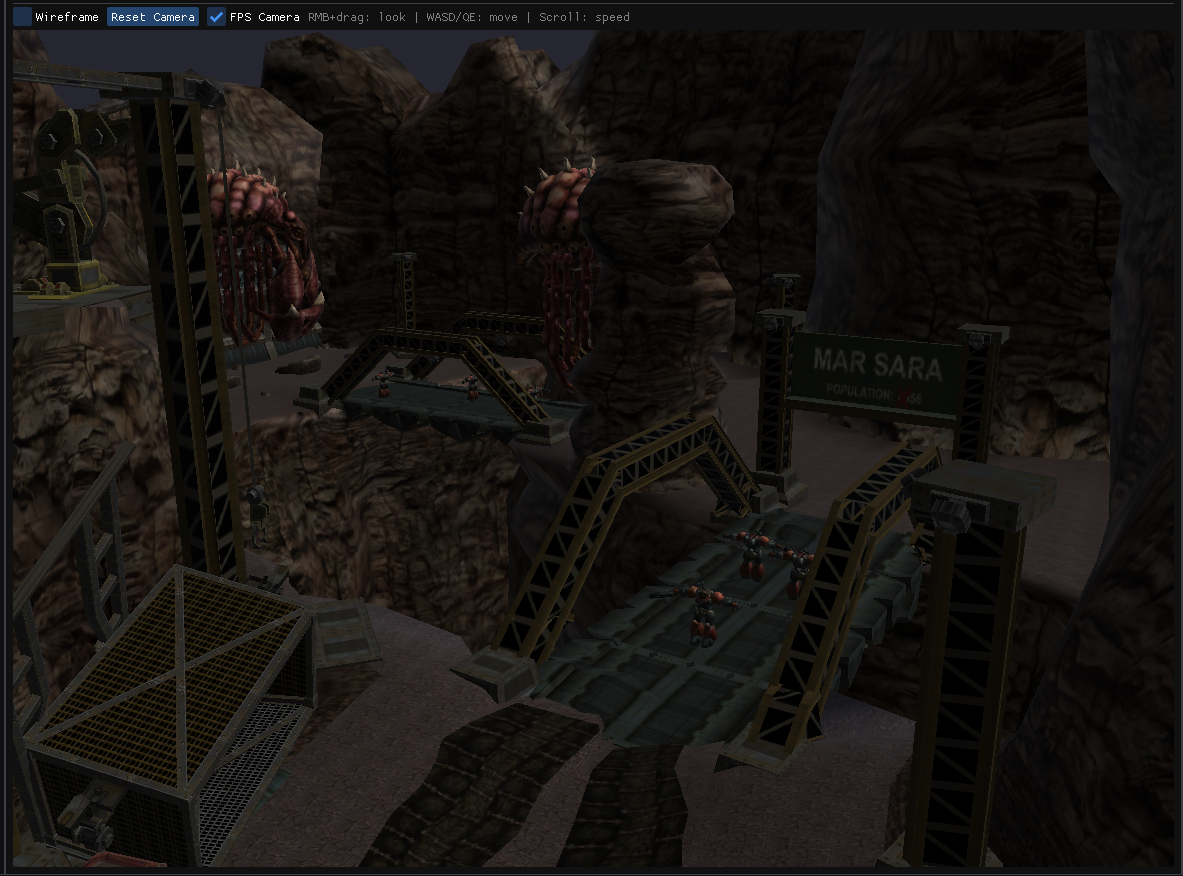 Figure 1. The Mar Sara environment displayed outside the original engine.
Bringing these pieces together tests more than whether each file opens. It tests whether references, transforms, and material relationships have been interpreted consistently.
The Mar Sara canyon is a useful example: terrain and structures provide a recognizable environment, while placed objects give positions and orientations something concrete to match against.
The current viewer uses entity-type resolution to find models it knows how to place. That is not the same as reproducing the game’s complete template and entity-construction path. Unresolved references and non-visual records remain useful information in the inspector.
In particular, a scene record can describe a script target or a trigger rather than something with a model. An inspector should make that distinction visible instead of treating every record as missing geometry.
Animation Needs More Than a File Name
An animation inspector exposes duration, bone-track information, and the keys associated with each track. Those fields let me compare the parser’s output with the structure inferred from the loader.
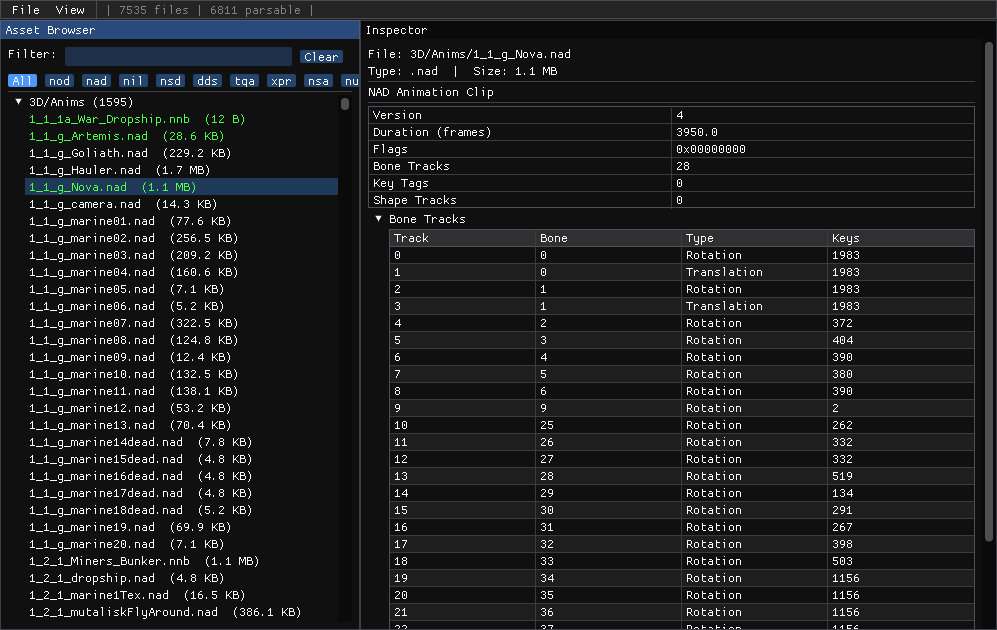 Figure 2. Inspecting Nova’s animation tracks rather than treating the clip as an opaque file.
Previewing supported animation adds another check: tracks need to correspond to the intended skeleton, and their values need to produce meaningful motion.
The Blender plugin provides a separate route into that data. It imports supported model and level formats, and imports NAD animation onto an active armature. That is useful for inspection in a familiar authoring environment, without requiring the original editor.
It does not reconstruct a complete cinematic. Actor animation is only one part of a sequence that can also require camera data, events, sound, and runtime behavior.
Not Every Useful Preview Is 3D
Scene inspection shows entity types and placement data. Material inspection exposes properties and resource names. Cutscene inspection can expose actor and event records without pretending to play the finished scene.
Audio banks benefit from the same approach. Listing entries and playing supported waves makes their organization easier to understand. Decoding a wave is separate from reproducing the game’s cue handling, mixing, and effects.
This is the broader purpose of the browser: give each format a view that makes its structure understandable. A table can be as useful as a rendered mesh.
What the Viewer Proves
The project documents format relationships and implements parsers, but support is not uniform. Reading a header, decoding a useful subset, and reproducing every field are different levels of understanding.
Likewise, displaying a scene is not running the game. The viewer does not recreate AI, physics, objectives, or mission scripting.
What it does provide is a way to test the boundary between stored data and the systems that consume it. If the same assumptions produce sensible geometry, references, and placements across files, they become more credible. When the result disagrees, there is a smaller problem to investigate than an entire reconstructed engine.
The earlier NOD SDK for Vampire helps as a comparison, but Ghost’s formats must be checked against this build. Similar names do not guarantee identical layouts or behavior.
A Foundation for Community Tools
The longer-term value is not limited to viewing Ghost’s assets. Documented formats and reusable parsers could support future modding work or help bring back parts of the NOD SDK toolchain for community development.
An inspector and importer are steps toward that goal, not a finished replacement for the original tools. Editing, exporting, and validating content for the runtime require more work.
Still, making the data readable is a useful beginning. It lets someone investigate a scene or animation without repeating every step of the original disassembly effort.
The tools also remain separate from the proprietary game data. Understanding a format does not confer permission to redistribute the assets stored in it.
The Progression So Far
The work had moved from curiosity to an architecture skeleton, then to a viewer that could test parts of the file-format understanding:
Read the binary -> Map the architecture -> Test the data in tools
These were related investigations, not planned stages of a complete engine rewrite.
Later, discovering XboxRecomp offered another experiment: use the original Xbox code through recompilation rather than wait for a manual source reconstruction to be complete. The next article follows that change of approach.
Project Material
- OpenNOD SDK source code (nodsdk-scghost): parser library, asset viewer, and Blender import plugin
- OpenNOD SDK format reference and implementation documentation
- Starev: the architecture reconstruction that preceded the viewer
- NOD Engine SDK v1.0, Nihilistic Software, 2000